AI prompterEarly access
A hint during the conversation, not after it
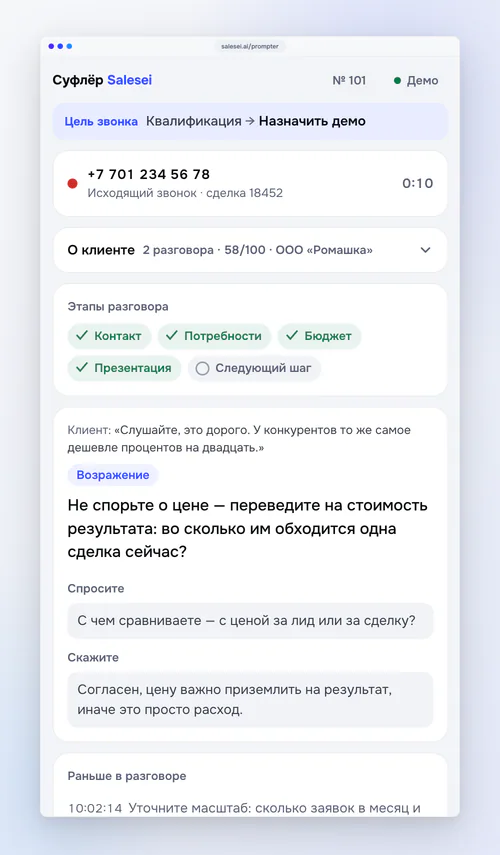
The prompter listens to the call, knows the stage and shows the rep one short hint: what to ask, how to answer an objection, which step was skipped. After the call that same moment becomes a breakdown and a drill.
Learning inside the conversation, not in a separate hour on the calendar
What it learns from
The company's best calls
Send scored calls with high scores — the prompter hints the way your strong reps talk.
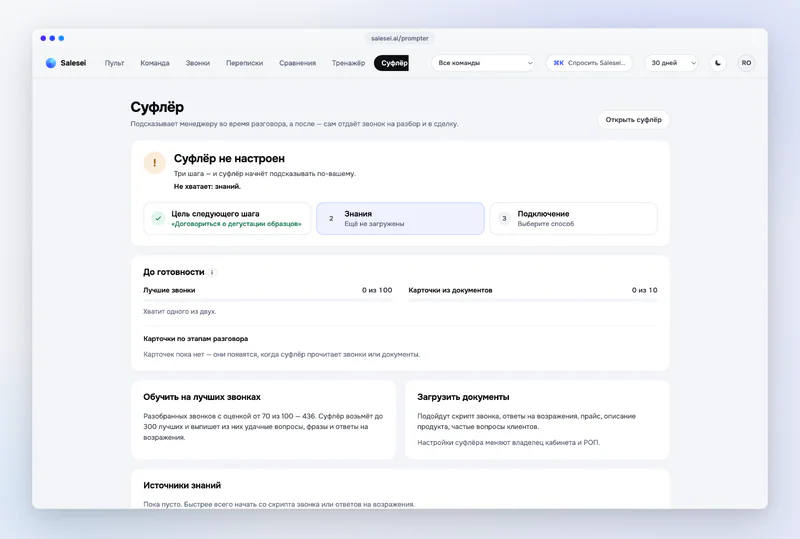
Your documents
Scripts, price list, product description — txt, docx, pdf. The knowledge base rebuilds itself.
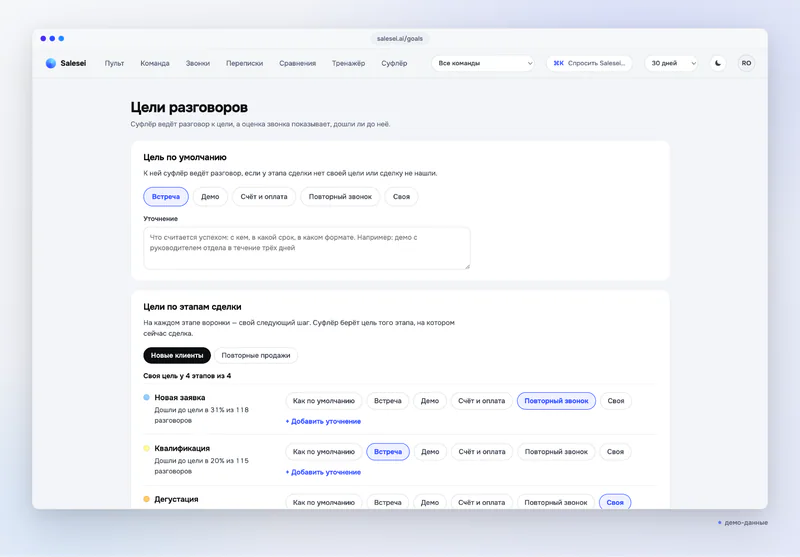
Call goal by deal stage
Each pipeline stage has its own next step. The prompter leads towards it, and the score shows whether you got there.
What we know about the customer
The deal, conversation history and agreements from the CRM — in the window before the first line.
Conversation stages
A checklist: what has been said, what is missing to reach the next step.
Where it works
A browser window
A separate “Listen to tab” window: pick the tab with the call or meeting — the prompter hears it and your microphone.
Chrome extension
Any call or meeting in a tab: Zoom, Google Meet, Microsoft Teams, Kontur.Talk, amoCRM and Bitrix24 web telephony. Chrome, Yandex Browser, Edge.
Bitrix24
An embed in the call card: the prompter opens with the call, the breakdown goes to the deal. Marketplace install — coming soon.
amoCRM
A widget: the prompter window right inside amoCRM for the duration of the call; the breakdown lands as a note and a task in the deal.
Audio from the PBX
Telphin streams both sides directly — no browser needed (early access). Other PBXs work through the extension; Asterisk is in development.
What it looks like

A different answer for each role
What the sales lead gets
A new rep isn't left alone with a difficult customer on day one.
The company script and standard work in the moment instead of sitting in a document.
You see which hints the team needs most often — that's the topic of the next drill.
Learning takes no separate time: it happens on real calls.
What the rep gets
The hint arrives while it can still change the outcome of the conversation.
No need to keep the whole script and the whole customer history in your head.
After the call — a breakdown and a concrete drill, not a reprimand.
The deal card fills itself.
61/100
SalesScore
After the call — a SalesScore
A prompter conversation goes through the same pipeline as every other call: a six-stage score, the weak spot, a drill. If the PBX has a recording, the score is based on the recording.
How SalesScore is calculated →Honest about the status: it works, early access
Works today
A browser window, the Chrome extension, the Bitrix24 embed, the amoCRM widget, live audio from the Telphin PBX.
Company knowledge: best calls and documents; a call goal by deal stage; customer context from the CRM.
After the call — a breakdown, a SalesScore and a deal entry.
Limits we state plainly
The delay before a hint is about 0.5–0.8 seconds: the hint comes after the customer's line, not during it.
Languages — Russian and Kazakh. Recognition and the language model run in Yandex Cloud; models are not trained on customer data.
Installation from the Bitrix24 Marketplace and an Asterisk gateway are in development. We show no effect figures.
Questions about the prompter
Does the customer hear the prompter?
No. The hint is text on the rep's screen. The prompter never joins the conversation.
How does it hear a call in Zoom or Meet?
The Chrome extension captures the audio of the meeting tab and the microphone. That's why it works with any call in the browser, not only telephony.
Do we need separate telephony?
No. A browser is enough. If you use Telphin, the audio comes straight from the PBX, no tab needed.
What happens to the conversation data?
The transcript and hints are stored in your workspace; recognition and the language model run in Yandex Cloud with no training on your data. One company's knowledge is never available to another.
Does it hint according to our script?
Yes, once you upload documents and send your best calls. Until then it hints from a general sales method.
Want the hint to arrive while the deal can still be saved?
The prompter is open in early access. Leave a contact — we'll onboard your team and show it on your call.
Try Salesei for freeEarly-access request
Leave a contact — we'll explain how to connect the prompter for your team and open access. We reply within a day.